









User Guide
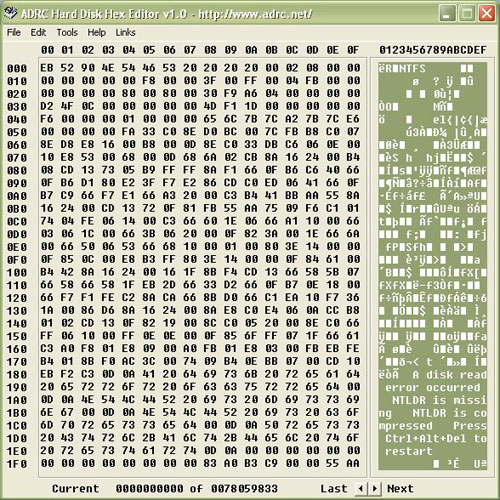
ADRC Hard Disk Hex Editor is a free page by page mode binary sector editor that allow you to access and edit any sector location of logical or physical data device in Windows operating system.
The tool is written with novice users in mind to access the binary contents of disk media directly.
It has a safety feature that unless the save command is activated, any changes will not take effect to prevent inadvertent loss of data.
It is advisable that before using such command, all important data must be fully backup as editing the disk directly using such Hex editor may result in permanent data loss if it is not used appropriately.
Love or hate our software?
We like to hear from you! Help us improve so that we can serve you better.
|
File Menu
Save Sector:
Saves the currently displayed sector to the disk.
Select Disk:
Allows you to choose which disk drive you are going to edit
Export Sector:
Allows you to export the currently displayed sector to a file for backup or transfering to another machine.
Import Sector:
Allows you to import a previously exported sector.
Print Sector:
Prints the current sector information to your printer.
Back to Top
Edit Menu
Copy To Buffer:
Copies the currently displayed sector to a temporary buffer so you can paste it elsewhere on the disk or on another drive.
Paste From Buffer:
Pastes a sector previously copied to the temporary buffer to the current location on the disk. This will not save the data to disk, you must still save any changes you make otherwise they will be lost.
Back to Top
Tools Menu
Undo Changes:
Undoing the changes will revert the displayed information to how it was when originally loaded or at the last save operation done on that sector. Any changes you haev made to the displayed data will be lost.
Goto Sector:
Brings up a dialog box asking for which sector number you wish to jump to on the current disk. If you go to a sector after the end of the drive, the last sector will be displayed.
Search Disk:
Allows you to search the disk for a specified string. The search will begin from the currently displayed sector and will run until the end of the disk unless you cancel the operation. This operation will take a very long time on large disks as all the data on the disk has to be read and checked.
Copy Block:
Allows you to copy a specified block of sectors from one location on the disk to another.
Back to top
|
