







 |
Sluggish Windows System | |
Windows Repair Install | |
Windows Restarts |
|
Windows Shows Incorrect 120GB Size | |
XP System Restore |  |
FIX Software Corruption |
|
Hardware Troubleshoot | |
Repair Corrupted DLL |
Related Topics
| BIOS / Boot Up Problems | Hard Disk / Chkdsk Problems |
Windows restarts without pre-warning
When your PC re-starts accidentally without any pre-warning, the possible reasons are as below:
Software Issue or Error
For non-Window XP users
- Reboot your computer in Safe mode
- If your computer does not restart automatically anymore, you will need to consider identifying and solving your software problem.
- If your computer continues to restart in Safe Mode without warning, it is likely that your computer suffers from other issue rather than software issue

For Window XP users
Each time error is detected, Window XP is designed to reboot automatically. However, by following the steps below could help the system stop rebooting and display error message whenever error is detected. From this, a user can detect for system error
- Right click on My Computer, choose Properties option
- Point to Advanced panel
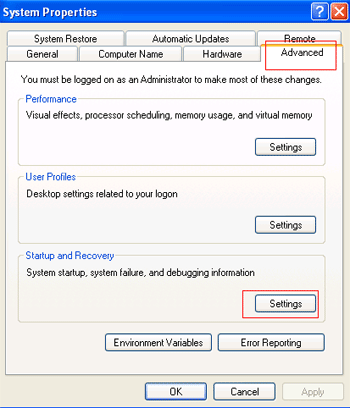
- Under Startup and Recovery, press button Setting
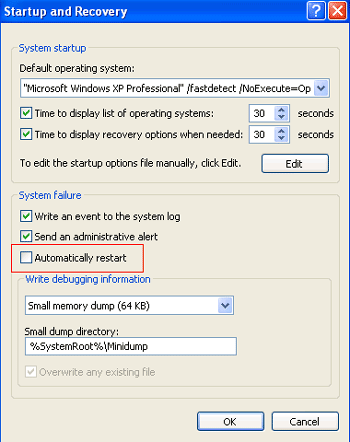
In the Startup and Recovery window uncheck the Automatically restart check box. Click Ok .
Hardware Issue Or Error
Failure in hardware operation may cause errors to be generated accidentally and Window system to be rebooted without warning.
If you have just installed any new hardware device, make sure it has been removed from your system
If you have just updated a new version for your drive, restore it with previous one
Your computer may be experiencing a hardware conflict. Try right-click on My Computer, choose Properties - Hardware - Device Manager .
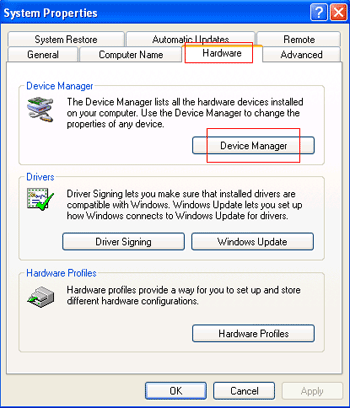
If there is any exclamation mark (!) appearing next to a particular device, it means this device has a conflict with other hardware device.
- Improperly installed hardware device may also cause a problem of automatic reboot. Try unplugging the cables and expansion card and re-connecting them again.
- If you have been trying all the above methods and still face with the same problem, your computer might be having a bad memory.

When the temperature on the motherboard or processor is getting too hot (above 60 Celsius degree), your computer system will likely reboot automatically because it has reached an unsafe mode of loading.
Virus HarmVirus (i.e. Blaster Worm) may cause the system to operate incorrectly and restart all over again and again. Time in between could range from 5-15 minutes. Systems affected by this kind of worm are Microsoft Windows NT, Windows 2000, Windows XP, and Windows Server 2003.
Out-Of-Date BIOS Chips
There is no harm that you should look out for BIOS update from your manufacturer. Minor problem in BIOS or even some errors with a part of hardware installed into your system may cause the sudden reboot of the system.