








FAQ
Before sending for data recovery
While working, what should I do once I realise I lose files I am working on ?
It really depends on the situation.If you are using MS office, it will normally save a temp file that can be loaded on the next startup.
Go to Start > Search. Then, click the more advanced option and check the “search hidden files and folders” option. Then in the search box copy and paste this:
*.tmp,*.chk,~*.*
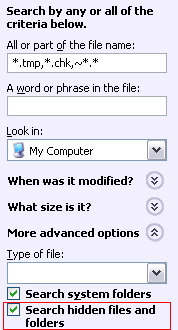
Copy out the files found to a different data partition or external usb devices. Do not save the files into the same data partition where you lose the data! Rename the files to the correct extension and try to open them one by one. If you are lucky, the windows might have saved a temporary file and it can be accessed and not corrupted.
If you have no luck, stop using the data media. Stop using the laptop, the ipod, the desktop, PDA, whatever!
If you continue using, there is a possibility that you will overwrite the data that you lost. Once it is overwritten, you may lose the last chance of recovering the data partially or completely.
Read DIY data recovery guide to see if it works out for you.
You last resort is to send the media for data recovery.
What are the chances of getting back my data?
What is Class 100 clean room? Why is it needed in the data recovery process?
What is the success rate of your service?
Why is data recovery so expensive?
What about my hard disk warranty? Will my warranty be void after the service?
How do I select the right service vendor?
Can I do my own recovery work?
While working, what should I do once I realise I lose files I am working on ?
Why should I choose your service over others?
How do you charge the price of your service?
Will it be cheaper if I want less data?
How about my data confidentiality? I absolutely do not want my data to get leaked out!
I have checked that your competitor quoted a much lower price than you do.