









Prevent Outlook Express DBX Data Corruption
What Is DBX Corruption?
Each folder listed on your Outlook Express Folder is stored in your hard disk as a single file together with its corresponding messages. This file has the same file name as the folder and is suffixed with a DBX file extension. This explains the Outbox.dbx, Drafts.dbx, Sent Items.dbx items you find in your store folder, which is typically an invisible folder located in the Documents and Settings folder in Windows 2000 and Windows XP. Occasionally, these files can be tampered upon due to human or software error which renders a file corruption causing the messages to be unreadable.

10 Steps To Prevent DBX Corruption
Here are 10 practical solutions that can help you prevent a dbx corruption.- Disable the Anti-Virus email scan
- Disable automatic background compaction
- Keep Inbox empty by moving messages to other folders
- Limit the size of the Sent Items and Inbox folder to no more than 2000 messages
- Compact all folders at a regular basis
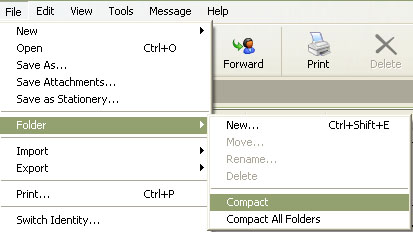
- When compacting, do not use your computer until the process ends
- Keep Anti-Virus software up to date with the latest patches
- Backup the Store Folder on a regular basis
- Avoid storing important messages with large attachments in Outlook Express
This keeps the DBX file small and hence minimizes the risk of losing crucial data. - Update and install any fixes or patches for Outlook Express